Project specified Dataset Manager (Audio / Time series)
Audio Classification
The Local Dataset Manager is the project-specific workspace that feeds data directly into the feature generation and training pipeline.
Transform Data Tab — Audio Conversion
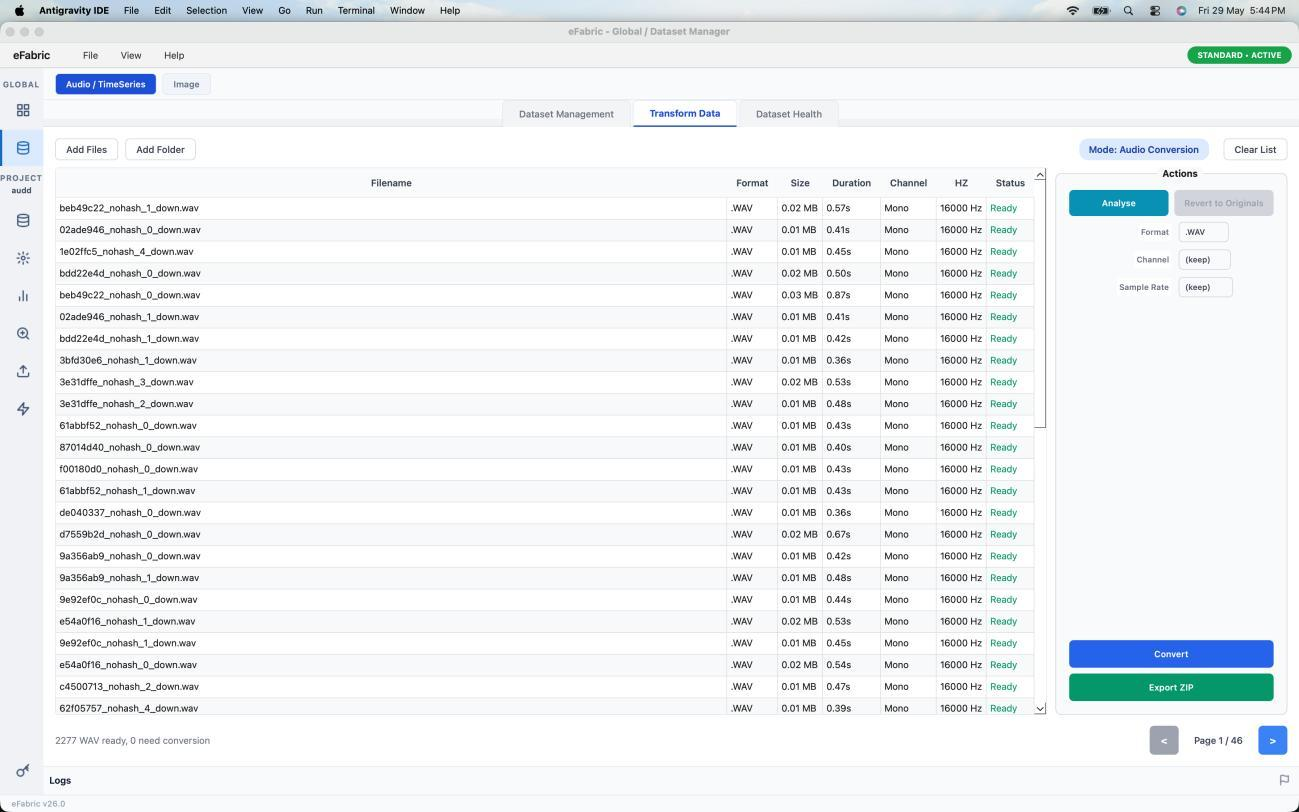
- Add Files or Add Folder to load audio files
- Click Analyze to read metadata (format, size, duration)
- Click Convert to WAV — originals are never overwritten
- Click Export ZIP to download all WAV files
Time Series Model
Transform Data Tab — CSV Normalisation (Time-Series)
- Add CSV files via Add Files or Add Folder
- Files load with Pending status
- Click Analyze to process the current page (50 files per page); navigate Prev/Next
- Click Normalize Data to apply [-1, +1] min-max normalisation
- Click Export ZIP (only enabled after all pages are analysed)
IMPORTANT
Export ZIP is only available after every page is analysed. Original source files are never modified.
| Status | Meaning |
|---|---|
| Pending | Loaded but not yet analyzed |
| Ready | Values within [-128, 255] |
| Out of Range | Values outside [-128, 255] — normalisation recommended |
| Normalized | Successfully normalised to [-1, +1] |
| No numeric cols | No analysable numeric columns |
| Error | File could not be processed |